


Hole19 Golf GPS & Range Finder
4.71.12K Reviews
App Specs
- Version
- 5.57.0
- Updated On
- License
- Free
- Downloads
- 5,000,000+
- Developer
- Hole19
- Categories
- Sports
- Platform
- Android
Screenshots
 Analysis by AppCompare
In a household where more than one person plays golf, a phone can end up doing double duty: one round’s scorecard is finished just as someone else is ready to head out. I like the idea of having distances and scoring together, but a shared device also makes it worth thinking about whose account is open and whose round is being recorded. Hole19 Golf GPS & Range Finder is most useful when each golfer treats the app as a personal on-course tool rather than a common household scorebook.
Getting Started with Hole19
First things first, setting up the app is a breeze. Available on both Android and iOS, you can download it from the respective app stores. Once installed, you'll need to create an account or sign in if you already have one. The interface is clean and intuitive, which I appreciate as someone who prefers spending more time on the course than fumbling with tech.
Setting boundaries on a shared phone
If you share a phone with a partner or another golfer, pause before a round and check which account is signed in. That small habit helps keep one person’s scores and activity from being confused with someone else’s. I would not pass a phone around mid-round and assume the app will know who is entering each result; the person holding it should confirm the active account and scorecard before adding anything.
For a household with separate phones, each golfer can keep their own login and use the app independently. On one shared device, agree on a simple handoff routine: finish or leave the current round in a clear state, then have the next player check the account and start their own scoring. This is less convenient than separate devices, but it avoids turning a useful record into a muddle of mixed rounds.
Features that Stand Out
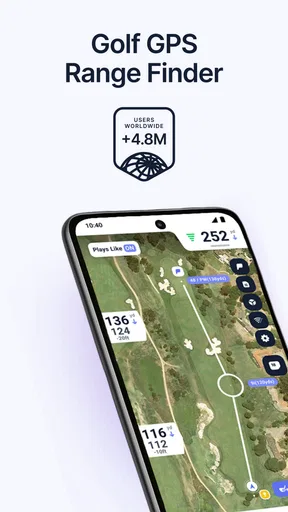
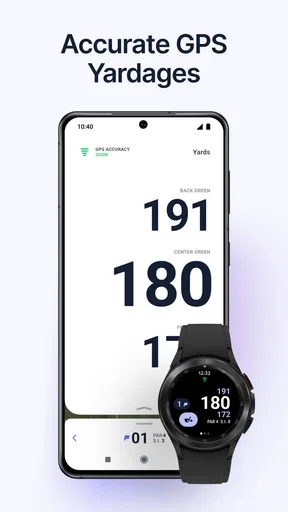
The Hole19 app is packed with features that cater to both amateur and seasoned golfers. The GPS feature provides accurate yardages to the front, back, and center of the green. Trust me, this is a lifesaver when you’re trying to gauge the distance for that perfect swing. The app also covers over 43,000 golf courses worldwide, so you’re likely to find your local course without any issues.
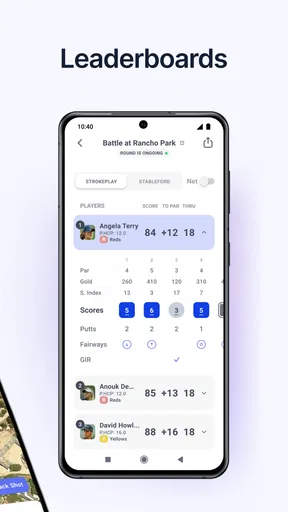
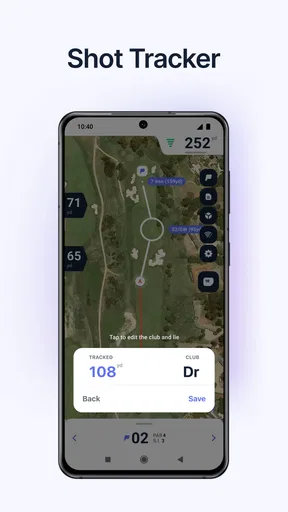
Another feature I found super handy is the digital scorecard. Gone are the days of juggling a pencil and scorecard in the wind. With Hole19, you can effortlessly track your scores and stats, helping you analyze your game over time. There’s even a shot tracker that lets you record the distance of each shot, which can be quite revealing if you’re looking to improve.
A practical routine for a round
For a weekend round, I’d check the course and set up the scorecard before reaching the first tee, rather than trying to navigate menus while a group is waiting. During play, use the front, center, and back distances as decision-making reference points, not as a promise that every shot will land exactly where planned. The number is useful context; wind, lie, elevation, and your own carry distance still matter.
Worth Reading Before You Choose

EA SPORTS FC Mobile 26 Is a Bigger Football Game, but It Takes Time

Flipboard Shows What News Apps Must Do Beyond the Feed

Switching to Android Auto Means Rethinking Your Driving Routine

Google Calendar Makes a Crowded Week Easier to Manage

Ludo King Makes the Most of the Minutes Between Plans

Baby Panda World Brings Quick Play to Modern Phones, but Its Game Library Feels Busy
A less obvious way to get value from the scorecard is to use it consistently even when the round is casual. A single score tells you little, but repeated records can help you notice patterns worth working on. The shot tracker can add detail, too, but only if you are willing to record shots without slowing down your group. If tapping in every result becomes a distraction, I would prioritize the scorecard and leave detailed tracking for a practice round.
That distinction is important for beginners. A new golfer may get more from learning a comfortable routine—checking a yardage, choosing a club, and keeping a score—than from trying to inspect every statistic after every hole. Experienced players may enjoy the extra detail, while casual players can keep the app’s role simple and avoid turning a social round into a data-entry task.
Community and Connectivity
One of the unexpected perks of Hole19 is its social aspect. You can connect with friends, compare scores, and even share your achievements. It's like having a mini social network for golf enthusiasts. I found this particularly motivating, as it adds a layer of friendly competition to the rounds.
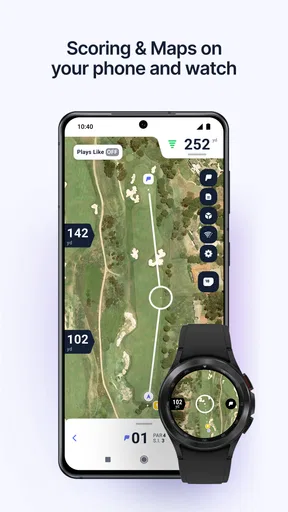
For those who love data, the app syncs seamlessly with wearables. So, if you’re sporting a smartwatch, you can get real-time updates without constantly checking your phone. It’s these little touches that make using Hole19 a pleasure.
Coordinating a group without slowing play
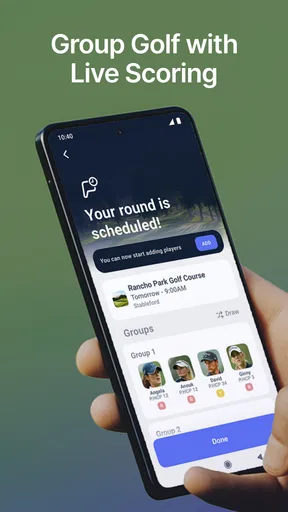
When I play with friends, I prefer agreeing in advance on whether everyone is keeping an individual score or whether one person is entering results for the group. The first approach gives each golfer a personal record; the second can reduce phone handling, but it also puts more responsibility on whoever is entering scores. A quick check after each hole is better than trying to reconstruct several holes at the end.
Social comparison is most enjoyable when everyone is comfortable sharing. Friends who like a bit of competition may appreciate comparing scores, while a beginner or occasional player may prefer to keep their round private. I would treat sharing as an optional part of the experience, not as the reason to use the app. The core value remains the on-course distance reference and a scorecard that is easier to manage than a loose paper one.
Compared with a basic GPS distance tool, this app brings scoring and social features into the same golf-focused experience. A paper card is still simpler, never needs a screen, and works well for someone who only wants to write down a total. A dedicated watch may be easier to glance at during play, while the phone can be more convenient for entering scores and reviewing a round. Which is better depends on whether you value quick access, fewer distractions, or keeping everything together.
Age, trust, and everyday use
The app is rated for Everyone, so its subject matter is suitable for a broad audience. In a family where a younger player shares a device with an adult, I would still make the account arrangement clear: the adult should know which profile is active, and the young golfer should understand that a score entered under that profile may be associated with it. Age suitability is not the same as a reason to share logins casually.
Hole19 is a sports app from developer Hole19. It is free to download, with in-app purchases listed from $2.99 to $99.99 per item. I’d start with the free experience and decide after a few rounds whether the app fits the way you play before considering a purchase. This is particularly sensible for a family: one person’s interest in deeper analysis does not mean everyone who borrows the phone needs the same paid extras.
The app has an average rating of 4.4 from around 30,000 ratings, and it has been installed over five million times. Those figures suggest it has found a substantial audience, but they cannot tell you whether its workflow suits your group. My practical test would be whether you can check a distance and record a score without distracting yourself or holding up the people playing with you.
In-App Purchases and Memberships
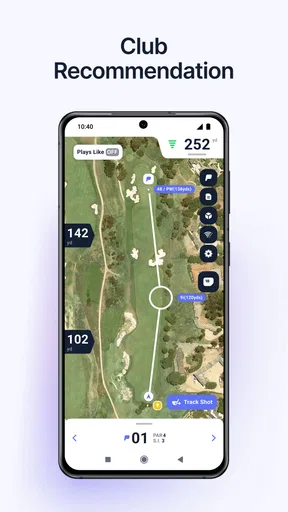
While Hole19 offers a free version, there’s also a premium membership called Hole19 Premium. This unlocks additional features like augmented reality views of the course, advanced statistics, and a club recommendation tool based on your previous rounds. If you’re serious about improving your game, the premium features are worth considering.
I opted for the premium trial, and the augmented reality view was a game-changer. It gives you a bird’s-eye view of the hole, helping you strategize your next move. Plus, the in-depth stats are pure gold if you’re into analyzing your game to the nth degree.
I would weigh those extras against how often you play and how much you enjoy reviewing your performance. A golfer who mainly wants straightforward yardages and a convenient scorecard may find the free option sufficient. Someone who regularly studies rounds could get more use from advanced statistics or club suggestions, but those tools are only helpful when the underlying round records are kept carefully. If your household shares one phone and several people enter scores into the same account, the analysis may be less useful because the history can be harder to interpret.
There is also a practical screen-time trade-off. A phone-based GPS tool is convenient, but it can pull attention away from the course if you keep checking it for information you do not need. I’d use the distance view when choosing a shot, then put the phone away. If you prefer to play without carrying or checking a phone, a paper card or a watch-based approach may be a better fit than trying to make this app part of every shot.
Who will get the most from it
I’d recommend it to golfers who want yardages and scoring in one place, especially those who play often enough to find a record of past rounds useful. It also suits friends who enjoy friendly score comparisons and players who are curious about their patterns rather than relying on memory. A newer golfer can use it as a simple guide to distances and scoring, provided they do not feel pressure to track every detail.
I’d skip it, or keep it secondary, if you want a completely screen-free round, dislike setting up an account, or only need to jot down a score now and then. It may also be a poor match for a household that expects one shared profile to keep several people’s histories neatly separated. In that situation, separate accounts and a clear handoff are more sensible than assuming the app will automatically distinguish each player.
Final Thoughts
All in all, the Hole19 Golf GPS & Range Finder app has been a fantastic addition to my golf toolkit. It’s user-friendly, packed with features, and enhances the overall golfing experience. Whether you’re a casual player or a golf aficionado, this app has something to offer.
So, next time you’re heading out to the course, give Hole19 a shot. Who knows, it might just shave a few strokes off your game and make your day on the green even more enjoyable. Happy golfing!
Pros
- Accurate GPS for on-course navigation.
- Extensive database of golf courses worldwide.
- Easy-to-use interface for quick access.
- Score tracking for individual performance.
- Community features to connect with golfers.
Cons
- Requires internet for full functionality.
- Free version has limited features.
- Battery drain during prolonged use.
- Occasional GPS signal issues.
- Ads in the free version can be intrusive.
FAQs for Hole19 Golf GPS & Range Finder
What features does Hole19 Golf GPS & Range Finder offer?
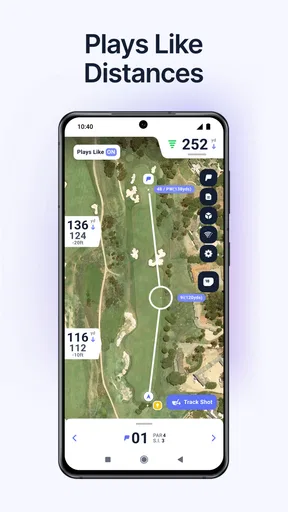
Hole19 provides golfers with a comprehensive suite of features, including accurate GPS distances, a digital scorecard, and performance statistics. It also offers aerial course maps and the ability to track your shots. The app enhances your game by providing insights and allowing you to compare your scores with friends.
Is Hole19 Golf GPS & Range Finder free to use?
Hole19 offers a free version with essential features like GPS distances and score tracking. However, for more advanced features such as shot tracking and detailed statistics, a premium subscription is available. This allows users to get the most out of their golfing experience with enhanced functionality.
Can Hole19 be used on all golf courses?
Hole19 boasts an extensive database covering over 43,000 golf courses worldwide. While it includes most popular courses, it's always a good idea to check if your local course is covered before heading out. The app frequently updates its database, adding new courses and features regularly.
Does Hole19 require an internet connection to function?
While many features of Hole19 can be used offline, such as the GPS rangefinder, an internet connection is needed for some advanced functionalities like downloading new course maps and syncing your scores. It’s advisable to download courses beforehand if you're planning to play without internet access.
How does Hole19 ensure the accuracy of its GPS distances?
Hole19 utilizes precise GPS technology to provide accurate distances to the front, middle, and back of the green. The app constantly updates its data and uses high-quality map imagery, ensuring golfers receive reliable information to enhance their strategic gameplay on the course.


